
You can check if a trade copier runs locally in about 10 minutes: open one demo trade, find the copier’s trade files on your own disk, and list the network connections your MetaTrader terminals open. When I traced one copied trade with Local Trade Copier (LTC) by Algonexis Technologies, mt4copier.com, it went from the master terminal to the client terminals as a one-line text file in my Windows AppData folder, not over the network. The only connection LTC itself makes is LTC Server’s licence check, which carries no trades.
Updated November 2026 for Local Trade Copier 3.1.8.
I created Local Trade Copier in 2010 and still develop it today. “Does my trade go through your server?” is a fair question about any copier. Here is how I check it, and how you can repeat the check on your own PC. For remote vs local vs cloud copiers in general, see my remote vs local trade copier guide.
The demo set-up I used
Everything below ran on one Windows PC, with demo accounts only:
- Master: MT5 at IC Markets, with LTC Server.
- Clients: MT5 at Pepperstone, MT5 at Vantage (where the symbol is EURUSD+) and MT4 at FXCM, each with LTC Client.
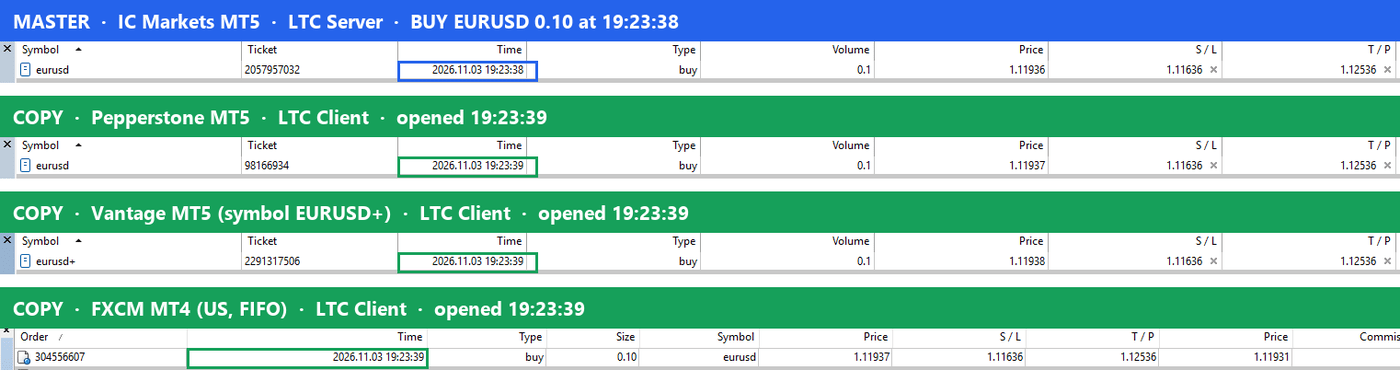
Then I opened one BUY EURUSD trade on the master and followed it.
How to check if a trade copier runs locally in 10 minutes
A local copier hands each trade over inside your computer, and its only trade traffic runs between each terminal and its own broker. A cloud copier copies on the provider’s servers instead. Three checks tell them apart:
- Look at the files the copier writes (2 minutes).
- List the connections your terminals open (5 minutes).
- Pull the plug on a demo set-up (a few minutes).
How a local trade copier works: the path of one copied trade
- The master trade opens. IC Markets fills the BUY EURUSD order, as it would without a copier.
- LTC Server sees it. By default, LTC Server checks the master account about every half second (SyncRate 400 ms).
- LTC Server writes a file. Each open master trade becomes a one-line text file named
<master ticket>.<master account>in%LOCALAPPDATA%\ea-coder.com\LTC\ltctrades<SPID>\. - LTC Server bumps a revision counter in the
trades_revisionsubfolder, so every client knows something changed. - LTC Client notices. By default, LTC Client looks for changes about every 0.1-0.2 seconds (SyncRate 100 ms). When the counter changes, it reloads the trade list and reads the new file.
- The client terminal sends the order. Each client’s own MetaTrader terminal sends the copy to its own broker: Pepperstone, Vantage and FXCM in my test.
- The copy is linked to the master. With the default
MagicNumber=0, the copy’s magic number is the master’s ticket number, so you can match each copy to its master trade.
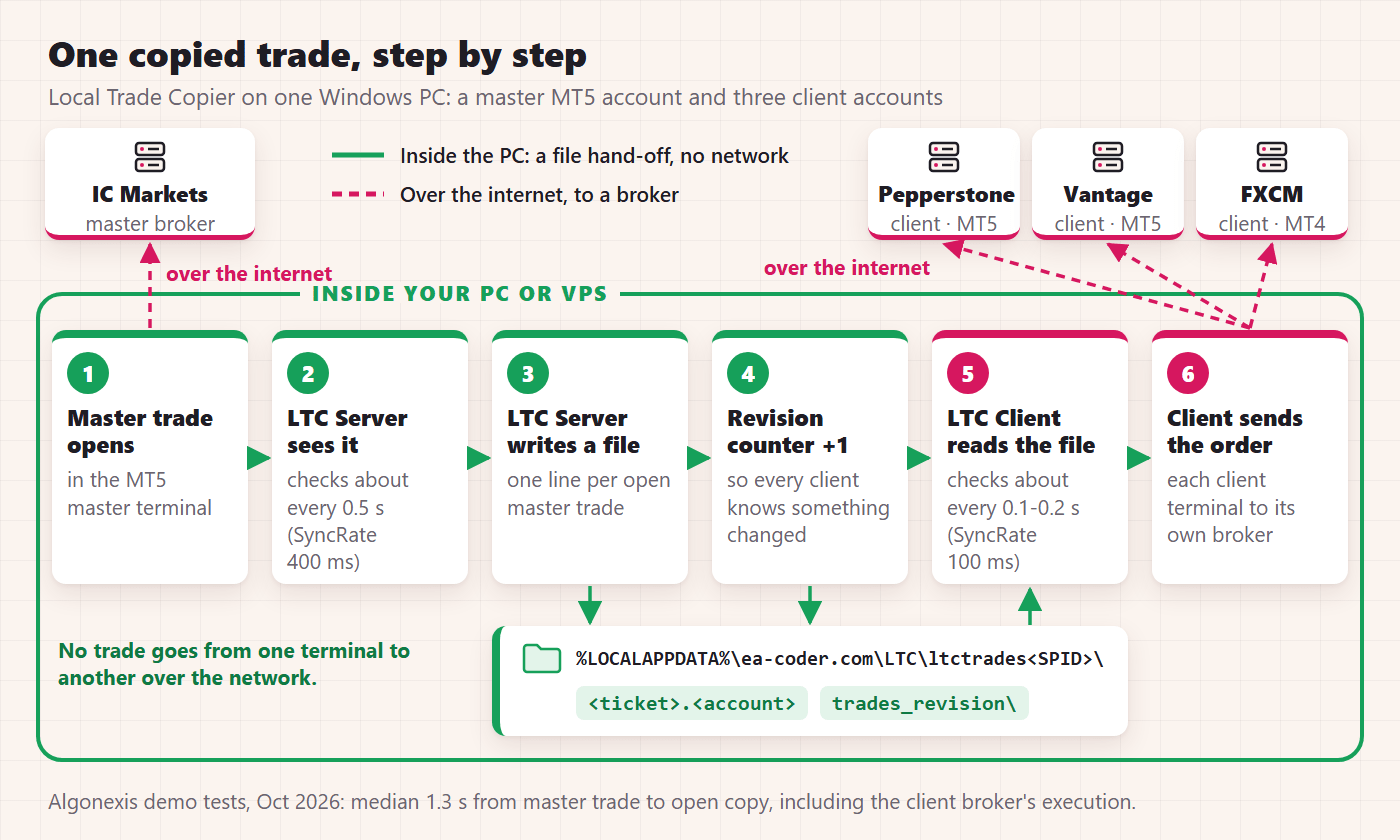
Steps 2 to 5 happen inside the PC. Steps 1 and 6 go over the internet, between each terminal and its broker. No trade passes from one terminal to another over the network.
Where the time goes
In Algonexis’ own tests on demo accounts (October 2026, 5-9 MT4/MT5 terminals on one Windows PC, several brokers), a new master trade was open on the client accounts about a second later (median 1.3 seconds), including the client broker’s execution time; closes and SL/TP changes took a median of about 0.9 seconds.
Most of that time is two things: the local hand-off (the two polling cycles above) and the client broker’s execution. LTC Client logs them separately in the Experts tab: one line says whether the master trade was copied on time (counted in whole seconds), another gives the broker/connection execution time of the order. This is what it logged in my demo session:
| Step (one BUY EURUSD 0.10, PC clock, 3 November 2026) | Logged at | After the master’s fill |
|---|---|---|
| IC Markets fills the master order | 19:23:38.648 | 0 |
| LTC Server detects the new trade | 19:23:39.382 | +0.73 s |
| LTC Server writes the trade file (“Database was updated successfully”) | 19:23:39.413 | +0.77 s |
| The two MT5 clients log the trade as received | 19:23:39.435 and .439 | +0.79 s |
| Copy open at Pepperstone MT5 (broker execution 156 ms) | 19:23:39.601 | +0.95 s |
| Copy open at Vantage MT5 (broker execution 469 ms) | 19:23:39.911 | +1.26 s |
| Copy open at FXCM MT4 (broker execution 469 ms) | 19:23:39.984 | +1.34 s |
The clients logged the trade as received 22 to 26 ms after LTC Server logged writing the file. Most of the time went to LTC Server noticing the new master trade and to each client broker’s execution. All three clients logged the master order as “copied on time”. One trade is one sample; the 1.3-second median above is the better general figure. The close a few minutes later was followed 0.24 to 0.44 seconds after the master’s.
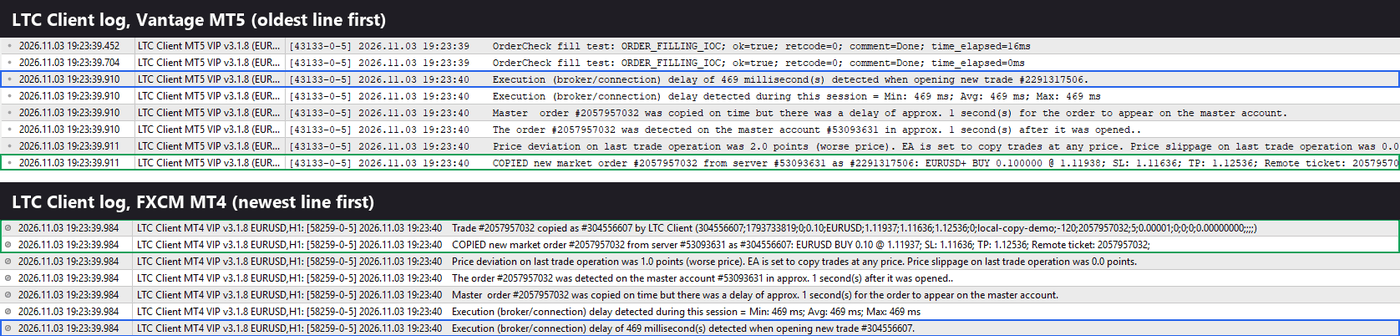
An ATTENTION! line with a delay of more than 10 seconds means something is slowing the copy down, for example too many terminals for the computer.
Check 1: look at the trade files on your own disk
Paste %LOCALAPPDATA%\ea-coder.com\LTC\ into the File Explorer address bar. You’ll see one ltctrades folder per Signal Provider ID (SPID) group. The LTC Server and LTC Client dashboards on the chart print the one your terminals use as Working Directory.
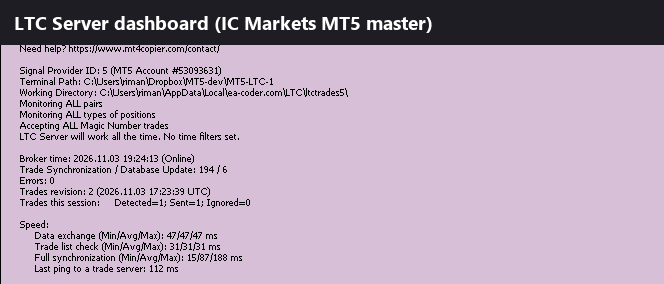
Inside, LTC Server keeps these plain-text files:
| File | What it is |
|---|---|
<master ticket>.<master account> | One open master trade on one line, fields separated by ; |
closed-<SPID>.<master account> | The list of closed master tickets |
server_info\server_info.<master account> | The master’s heartbeat, refreshed every 15 seconds: account number, balance, equity, currency, trade server, leverage, versions, connection status |
trades_revision\trades_revision_server_<master account>.<n> | The change counter and a time stamp |
Open the trade file in Notepad. This is the line LTC Server wrote for my demo trade:
2057957032;1793733818;0;0.10000000;EURUSD;1.11936;1.11636;1.12536;0;local-copy-demo;-120;20261020;5;0.00001000;5;USD;1793733819;0.00000000;75891.19;75891.09;;;0;0;;53093631;100000.00000000;-7200;EURUSD;5000;3.1;0;MT5;;0;0.00000000;r36;r37;r38;r39;It starts with the ticket, open time, order type, lots, symbol, open price, SL and TP. More fields follow, including the master’s account number, balance, equity, currency and leverage.
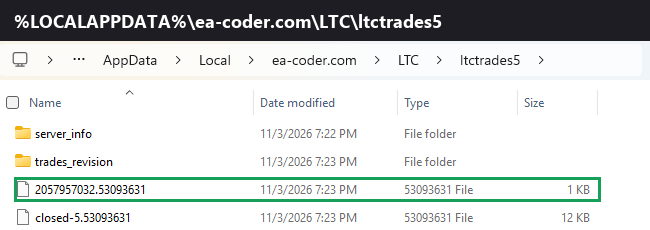
What this proves: the hand-off between terminals is a file on your own disk. It isn’t in the terminal’s MQL4\Files or MQL5\Files folder, or in Common\Files. LTC’s DLL writes it to the Windows user’s AppData folder, which is why “Allow DLL imports” must be on in every terminal that runs LTC.
An honest note: the files aren’t encrypted, so any program running under your Windows user can read them. You may also find files from older trades; look at the newest one.
For any other copier that says it runs locally, ask how its terminals pass trades to each other. Files or shared memory on the same machine are local. “Through our server” isn’t.
Check 2: see which network connections your MT4 and MT5 terminals open
This is the check I trust most, because it doesn’t depend on what any vendor says. Open PowerShell (no admin rights needed) and run:
$ids = (Get-Process terminal, terminal64 -ErrorAction SilentlyContinue).Id
Get-NetTCPConnection -OwningProcess $ids -State Established |
  Select-Object OwningProcess,
    @{n='Terminal';e={(Get-Process -Id $_.OwningProcess).Path}},
    RemoteAddress, RemotePort |
  Sort-Object Terminal, RemoteAddress |
  Format-Table -AutoSize -Wrap
MT4 runs as terminal.exe and MT5 as terminal64.exe. The Terminal column shows each program’s folder, which usually tells you the broker.
Prefer a window? In Resource Monitor (Win+R, resmon), open the Network tab and tick terminal.exe and terminal64.exe; the TCP Connections panel shows their remote addresses and ports.
How to read the list
- Broker trade servers. Each terminal keeps a connection to its own broker for prices and orders. Your copies travel over these.
- MetaQuotes services. MetaTrader can also connect to MetaQuotes, the company behind MT4 and MT5, for things like updates and news. These appear with or without a copier.
- LTC Server’s licence check. A short HTTPS request when LTC Server starts and about once an hour. LTC’s DLL runs inside the terminal, so it shows up under the master’s terminal process. You may only catch it right after you start the master terminal.
- Nothing from LTC Client. LTC Client has no licence check and no network code of its own.
Ports won’t tell you who is on the other end (many use 443), so look up unknown addresses with a whois service. A useful trick: run the command before you attach the copier and again while it runs. With LTC, the only connection the copier adds is the licence check.
What I found on my PC
I logged every connection the four terminals opened, from start-up until the demo trade was closed about eight minutes later, with a small script that reads the same Windows data as the command above (every connection state, not only Established):
| Terminal | Distinct remote addresses | Ports | Connected to the Algonexis licence server? |
|---|---|---|---|
| Master: MT5 at IC Markets, LTC Server | 25 | 443, 1950, 1953 | Yes, once, at 19:22:40, the second LTC Server logged “license key validation successful” |
| Client: MT5 at Pepperstone, LTC Client | 26 | 443, 1950 | No |
| Client: MT5 at Vantage, LTC Client | 3 | 443, 703 | No |
| Client: MT4 at FXCM, LTC Client | 18 | 443 | No |
No terminal connected to another terminal, and none connected to localhost (127.0.0.1): the trade really did travel as a file. Because LTC Client has no network code, every connection a client terminal opened was MetaTrader’s own: its broker’s access and trade servers (one resolved to FXCM’s mt4d06.fxcorporate.com) and MetaQuotes services such as mail.metaquotes.net. A long list is normal, because MetaTrader connects to several of its broker’s access points and to MetaQuotes by itself.
What a cloud copier looks like in the same test
With a cloud copier, you give the service your account logins, and its servers log in to your accounts and place the copies there. Run the same check on your PC and the copying doesn’t show up at all, because the copies are placed from the provider’s servers; at most you’ll see your browser talking to the provider’s website. Hybrid tools, a desktop app plus a relay server, show a third pattern: a steady connection to a server that is neither your broker nor MetaQuotes.
That doesn’t make cloud copying bad. It’s the better choice when you don’t want to keep a PC or VPS running, or when the accounts you copy to belong to other people on other computers. But if a product says it runs locally, this test shows whether it does.
Check 3: the pull-the-plug test, done safely on a demo
Do these tests on demo accounts only. They show what the copier does when part of the chain disappears.
Close the master terminal
Close the master terminal while a copy is open and watch the client’s Experts tab. About 60 to 75 seconds after the master’s last heartbeat, LTC Client logs WARNING! LTC Client lost connection with the MT5 master account #… with the time the master was last seen. The copies stay open; LTC doesn’t close anything because the master went quiet.
Start the master again and LTC Server rewrites every open trade (TRADE #… found on INIT in its log). The clients then follow closes made in the meantime, for example from the MetaTrader phone app. One limit in 3.1.8: a partial close on an MT5 master made while LTC Server is off is not followed.
Restart a client terminal
Close one client terminal. On the master, open a new trade and move the SL of a trade that was already copied. Then start the client again.
- The new trade is not copied. By default, LTC Client doesn’t copy master trades that already exist when it starts (
CopyExistingMasterTradesOnStart, default false, in the Client EA settings). - The SL change reaches the old copy. Copies made before the restart stay managed: SL/TP changes and full closes made in the meantime are applied after the restart.
- Your other trades are left alone. Trades on the client account that LTC didn’t open are never touched.
It’s off by default because a trade copied late opens at the current price, not at the master’s entry.
Lose the licence server or the internet
You can’t easily cut the licence check alone, so here is what the code does:
- If the licence server can’t be reached while LTC Server runs, it keeps copying and retries hourly for up to 4 days. After that, it stops.
- If the licence server rejects the licence, for example because it has expired, LTC Server stops.
- If LTC Server can’t reach the licence server when it starts, it doesn’t start and shows “Failed to verify your LTC Server License Key”. My post on fixing the licence verification error covers the usual causes.
- If the whole PC loses its internet connection, every terminal loses its broker, and LTC Client copies nothing until the connection is back (see fixing MT4 connection problems).
What does leave my PC
Put the three checks together and this is everything that leaves the PC. No trade goes through any server of ours or any cloud:
| Traffic | From which terminal | What it carries |
|---|---|---|
| Broker connection | Every terminal, to its own broker | Prices, orders and account updates. Each copy is placed from the computer, and IP address, where its client terminal runs. |
| LTC Server’s licence check (HTTPS, at start and about once an hour) | Only a terminal that runs LTC Server | A licence check only. It sends no trades and no trading passwords. |
E-mail and push alerts (AlertByEmail, AlertByPushNotifications, both off by default) | A terminal running LTC, only if you switch them on | MetaTrader sends them; at AlertLevel 3 they include trade details such as symbol, price and lots. |
| MetaQuotes services | Any MetaTrader terminal, with or without a copier | MetaTrader’s own traffic, which has nothing to do with the copier. |
LTC never asks for your trading passwords; you log in to each account in MetaTrader yourself. Only LTC Server needs a licence key; LTC Client needs none.
SPID groups and the same-computer rule
On disk, a copy group is just a folder. LTC Server writes to the folder of its Signal_Provider_ID (SPID): ltctrades for SPID 1, ltctrades2 for SPID 2, and so on. Each LTC Client reads only the folder of its own SPID. That is how several masters can feed different client accounts on one PC or VPS. Because every file name carries the master’s account number, masters that share one folder don’t mix either.
Inside its folder, a client follows every master by default; the “Copy From These Master Accounts” input narrows that to the accounts you list. AllowCopyTradesFromMyself is off by default, so a client ignores trades from its own account when a Server runs on it too.
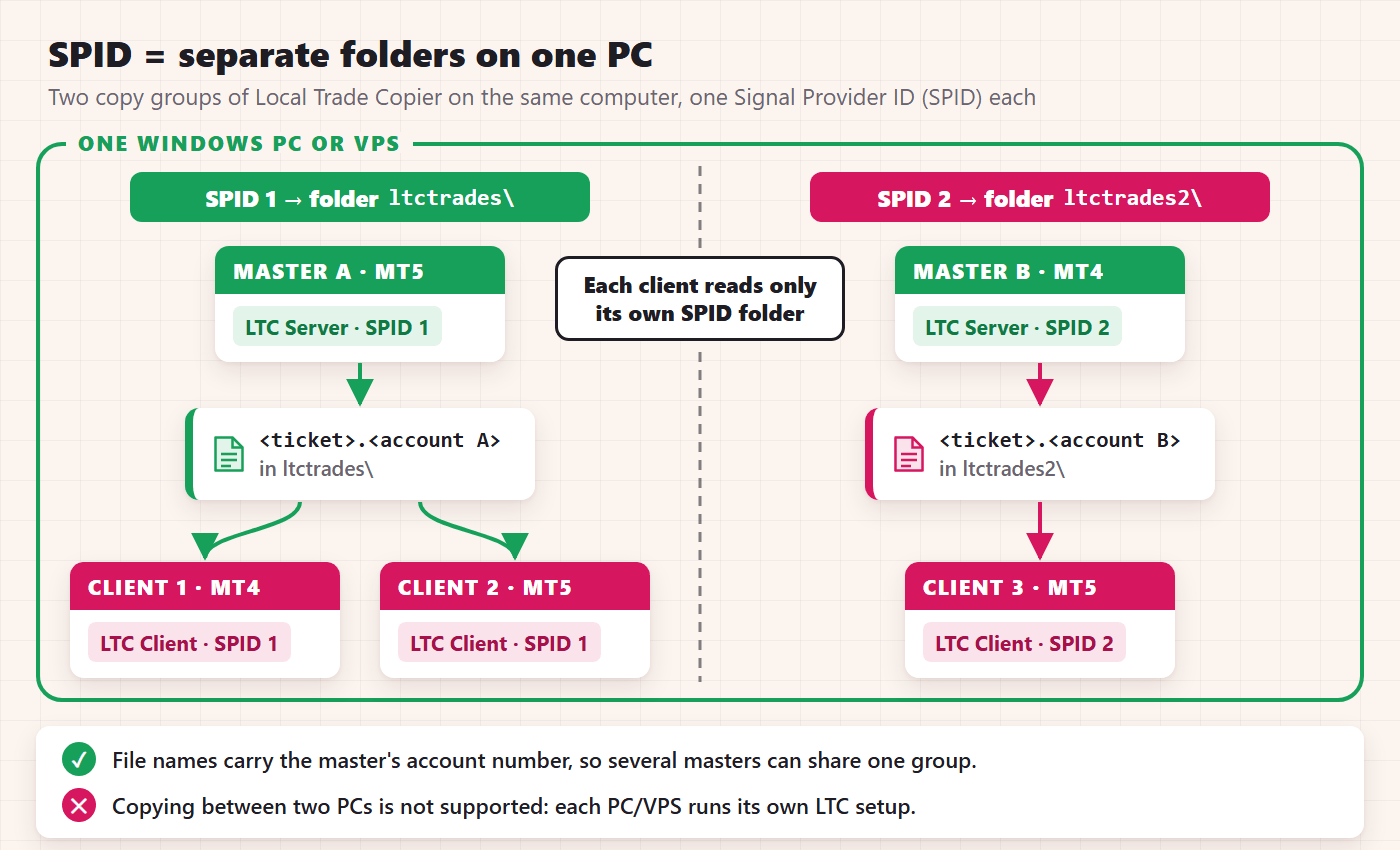
The same-computer rule follows from the same design. The folder lives in one Windows user’s AppData folder on one disk, and LTC sends no trade over the network, so all terminals of one LTC setup must run on the same PC or VPS. Copying between two different PCs is not supported. Each PC or VPS runs its own LTC setup and uses one licence slot. The plans cover 1, 5 or 15 PCs/VPSs, each with unlimited MT4 and MT5 accounts; Manager and VIP also add position size splitting, martingale mode (MT4), the MAAB Trade Filter and copying across Windows user profiles.
That last one is CustomWorkingDirectory: different Windows user profiles on one computer need it to point every EA to the same folder. For many terminals on one machine, see how to set up multiple MT4 terminals. To run one EA on a master and copy it to several prop accounts on one VPS, see FxMagnetic strategies on MT5 and several prop accounts from one VPS on fxmagnetic.com.
The operator’s side: what the design asks of your PC
Everything in the trace happens on one computer, and each requirement follows from that:
| What the PC needs | Why |
|---|---|
| To stay on, awake and online | The hand-off is a file on this PC, and each copy is sent by a terminal on this PC, so nothing is copied while it sleeps. Switch off sleep mode, or use a Windows VPS. |
| Its terminals started again after a reboot | LTC lives inside MetaTrader and doesn’t start it by itself. LTC Server checks its licence when it starts, so if the internet was down then, restart the master terminal once the connection is back. |
| A terminal for each account, with “Allow DLL imports” on | Every account in the trace has its own terminal, and LTC’s DLL writes and reads the trade files you opened in Check 1. |
| AutoTrading on and “Allow live trading” ticked on every client (“Algo Trading” and “Allow Algo Trading” on MT5) | In step 6 the client terminal sends the order itself. |
| CPU and memory use below 70% | Too many terminals for the computer slow the copy down; an ATTENTION! line in the Client log warns you. The mt4copier.com pricing FAQ lists VPS sizes. |
| A real Windows PC or VPS | LTC doesn’t run on MetaTrader’s built-in virtual hosting. It also runs on a Mac through Wine. |
Frequently asked questions
Does a trade copier send my trades to a server?
A cloud copier does by design: its servers log in to your accounts and place the copies. Local Trade Copier doesn’t, and the checks above show it on your own PC: the master’s trade appears as a one-line file under %LOCALAPPDATA%\ea-coder.com\LTC\, and the only connection LTC adds is LTC Server’s licence check, which carries no trades.
Which terminal shows LTC’s own internet connection?
Only a terminal that runs LTC Server. Its licence check runs inside that terminal’s process, at start and about once an hour. On client terminals LTC adds no connection: LTC Client has no licence check and no network code of its own. Every terminal still needs its own broker connection.
Why does the master accept an investor password when a client doesn’t?
Because of what each EA does. LTC Server only reads the master’s trades and writes them to a file, so a read-only investor login is enough, unless CloseTradesWithClient is on. LTC Client sends orders, and an investor login can’t trade, so every client account needs its trading password. My MT4 investor password guide explains the difference.
Run the check yourself
For the buyer’s short answer to the same question, see which MT4 copier runs locally without cloud routing. For the set-up, see how the trade copier works and copying MT4 and MT5 trades locally. To trace a trade on your own PC, you can try Local Trade Copier free for 7 days at mt4copier.com/trial/.
Rimantas Petrauskas has built trading tools for MetaTrader traders since 2009. He created Local Trade Copier in 2010; more than 10,000 licences have been sold to buyers in over 100 countries. He runs Algonexis Technologies in Dubai.