
A remote trade copier copies trades from a MetaTrader account on one computer to accounts on other computers. The trades pass through a server in between. A local trade copier does the same job on a single PC or VPS, with no server in the middle. If all the accounts you want to connect are yours, a local copier is usually simpler, faster and cheaper. You need remote copying only when the receiving accounts run on other people’s computers, for example when you sell trading signals.
Looking for EA Coder’s Remote Trade Copier? Rimantas Petrauskas released Remote Trade Copier (RTC) for MetaTrader 4 in 2011 and later renamed it Signal Magician. Signal providers used it for many years. The product is now retired and no longer sold, because the industry moved to cloud-based copy trading. Old RTC links on ea-coder.com now lead to this guide. To copy trades between your own MT4 and MT5 accounts, use Local Trade Copier (LTC) by Algonexis Technologies, which has been developed since 2010 and is still updated today.
The three ways to copy trades between MetaTrader accounts
Every MT4/MT5 trade copier uses one of three set-ups. The difference is where the copying happens.
- Local copying: the master and client terminals run on the same Windows PC or VPS, and the copier passes trades between them on that machine.
- Remote copying (self-hosted): the master terminal sends each trade to a server, often a web server with a database, and client terminals on other computers fetch the trades from it.
- Cloud copying (a hosted service): a company’s servers log in to your trading accounts, or connect to the broker, and copy trades for you. You don’t run MetaTrader yourself.
How a remote trade copier works
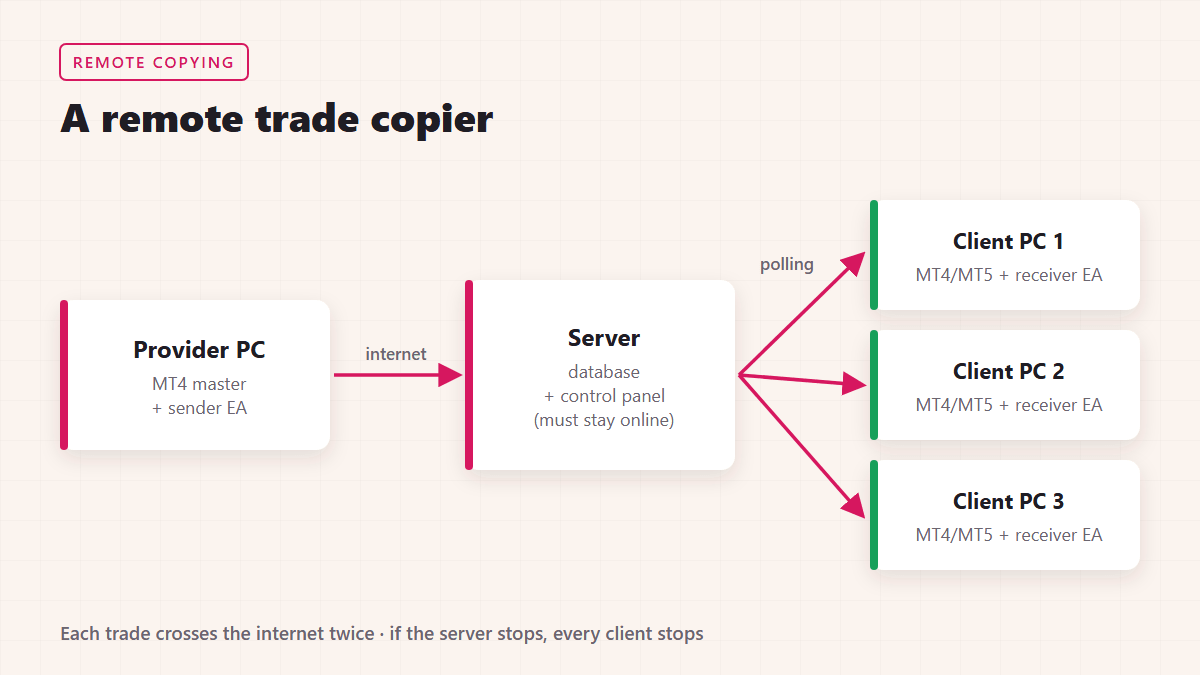
A remote copier usually has three parts:
- A sender (master) Expert Advisor on the provider’s MetaTrader terminal. It watches the account and reports every new order, modification and close.
- A server that stores the trades and decides who may receive them. In EA Coder’s Remote Trade Copier this was a MySQL database with a web-based control panel for managing subscribers.
- Receiver (client) Expert Advisors on each follower’s terminal. They check the server every few seconds, open the same trades with their own lot size, and follow later changes such as a moved stop loss or a partial close.
Because each trade crosses the internet twice, the delay depends on the master’s connection, the server and every client’s connection. If the server goes down, every client stops copying at once. That’s why remote copiers need monitoring, backups and someone to look after the server.
How a local trade copier works
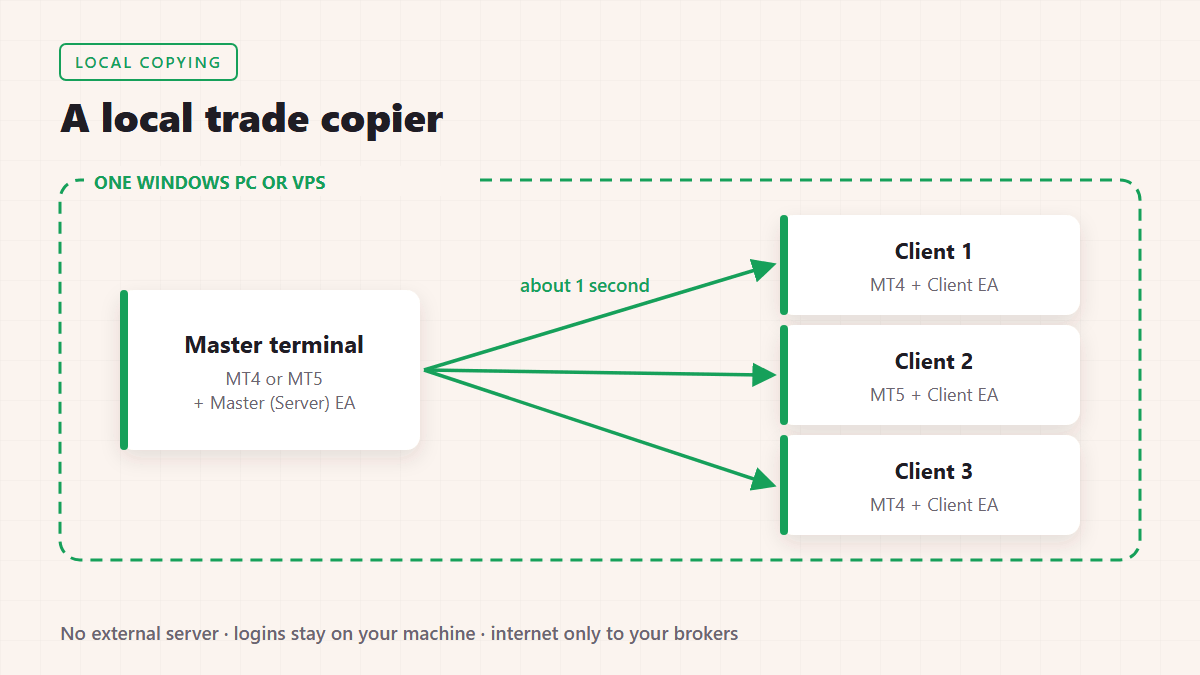
A local copier runs as an Expert Advisor inside each MetaTrader terminal on the same computer. The master terminal writes its trades to a place that the client terminals on that machine can read, and each client opens or adjusts its own trades. Nothing is sent to an outside server.
Local Trade Copier works this way. It copies trades in about 1 second or less under normal market conditions, between MT4 → MT4, MT5 → MT5, MT4 → MT5 and MT5 → MT4. It adjusts lot sizes for different balances and deposit currencies, and it detects symbol suffixes such as EURUSD.fx. A typical VPS with 1 CPU and 1 GB RAM runs about 4 MetaTrader terminals with the copier, and bigger servers run many more.
How a cloud copy-trading service works
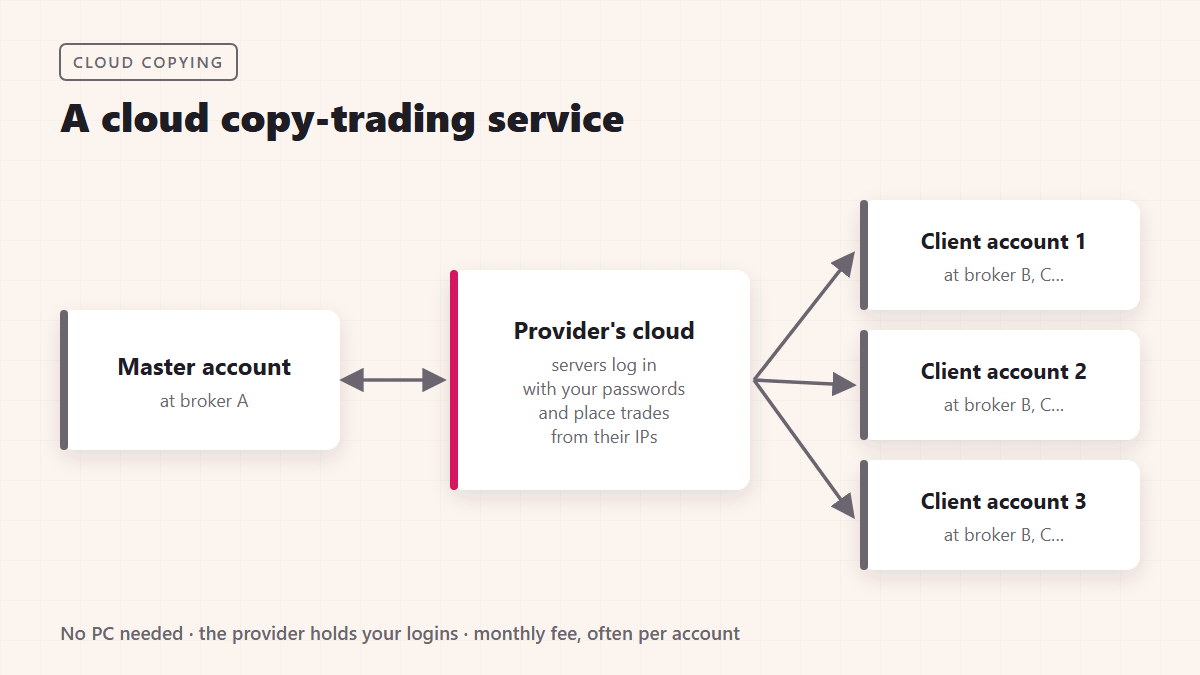
A cloud service connects to your broker accounts from its own servers, so you don’t need a PC or VPS running all the time. In exchange, you give the service your account logins, your trades come from its servers and IP addresses, and you pay a subscription, often per account. Settings are usually simpler than those of an Expert Advisor, but you depend on the service staying online and keeping your data safe.
Remote, local or cloud: a side-by-side comparison
| Local copier | Remote copier (self-hosted) | Cloud service | |
|---|---|---|---|
| Where the copying happens | Your own PC or VPS | Your server plus each client’s computer | The provider’s servers |
| Typical delay | About 1 second or less | A few seconds (two internet trips plus polling) | Varies by provider and broker |
| What you have to run | MT4/MT5 terminals on one machine | A server, a database, and the terminals on every computer | Nothing; you just log in |
| Who holds your account logins | Only you | Each account owner | The cloud provider |
| Trades placed from | Your machine and its IP address | Each client’s own machine | The provider’s IP addresses |
| Best for | Your own accounts, family or managed accounts on one VPS, prop firm and personal accounts | Selling signals to traders who run MT4 on their own computers | Traders who don’t want to run MetaTrader at all |
Which one do you need?
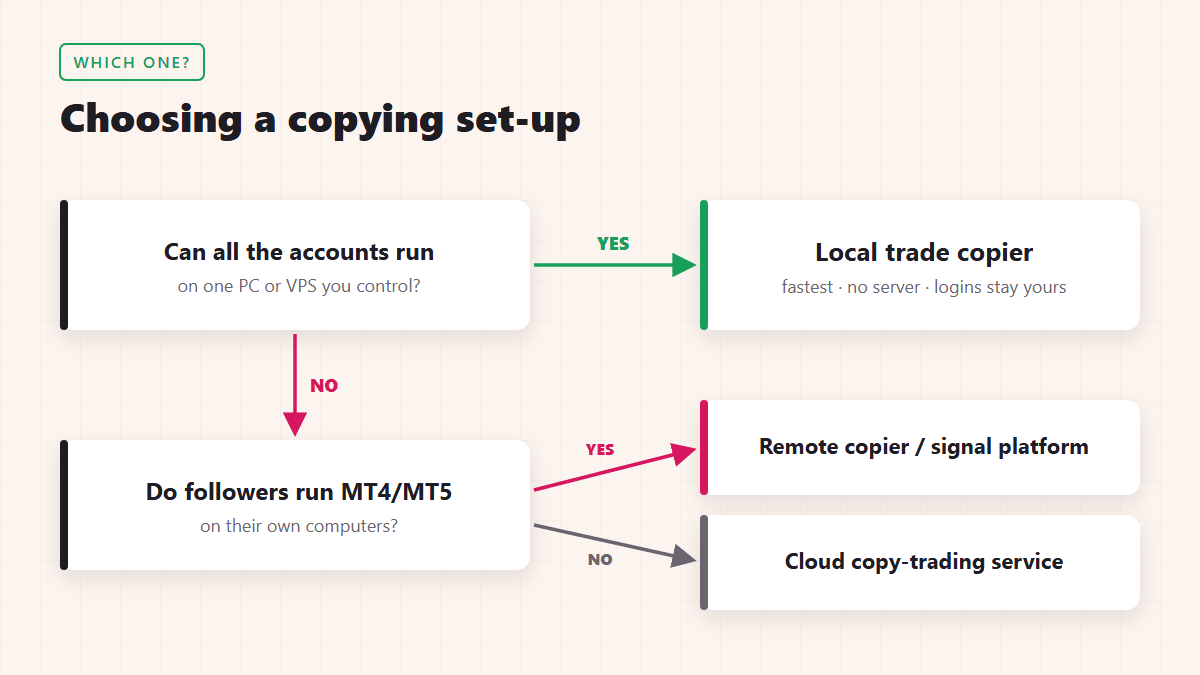
- All accounts are yours, or you can run them on one VPS: use a local copier. It has no server to maintain and no third party holding your logins, and it’s the fastest of the three.
- You sell signals to people who keep their accounts on their own computers: you need remote copying, or a cloud or signal platform that handles subscribers and payments.
- You don’t want to keep any terminal running: a cloud service is the only option, at the cost of control and monthly per-account fees.
Many traders who once used a remote copier now copy locally. A Windows VPS costs little, it runs 24/7, and every MT4 and MT5 account can sit on the same machine. The set-up that used to need a database and a control panel now needs a single VPS.
How to copy trades locally with Local Trade Copier
- Get a Windows PC or a Windows VPS. A real VPS is required: the “MQL5 VPS” inside MetaTrader doesn’t work. Mac users can run MetaTrader through Wine or use a Windows VPS.
- Install a separate MetaTrader 4 or MetaTrader 5 terminal for each account, and log in to each one.
- Attach the Local Trade Copier Master (Server) EA to an empty chart in the account you copy from.
- Attach the Client EA to an empty chart in each account you copy to, and choose a money-management mode, for example the same risk in percent of balance.
- Open a small test trade on the master and check that it appears on every client within a second or two.
The default settings copy trades without any extra configuration. You can add symbol mapping (e.g. GOLD → XAUUSD), reverse copying, trade filters and separate master/client groups later. The how it works guide and the features list explain each option.
Common problems when copying trades (and how to avoid them)
- Delays and missed trades: remote copiers depend on two internet connections and a server. Run the terminals on a VPS close to your broker, and with a local copier keep all terminals on that VPS.
- Different symbol names: brokers name instruments differently (
EURUSD,EURUSD.fx,GOLD,XAUUSD). Use a copier that detects suffixes and supports symbol mapping. - Wrong lot sizes: accounts with different balances or deposit currencies need proportional sizing. Check the money-management mode before you go live.
- Orphan trades: if the copier loses the link between a master trade and its copy, the copy is never closed. A good copier keeps that link through restarts, partial closes and Close By.
- Broker and prop firm rules: some brokers forbid EAs, and some prop firms restrict copy trading or require a fixed IP address. Read your firm’s rules before you copy funded accounts.
- Computer switched off: local and remote Expert Advisors only copy while the terminals are running. A VPS solves this.
Frequently asked questions
What is a remote trade copier?
It’s software that copies trades from a master MetaTrader account to accounts on other computers through a server in between. Signal providers have used it to deliver trades to subscribers automatically.
What happened to EA Coder’s Remote Trade Copier?
Remote Trade Copier (2011) was renamed Signal Magician and served signal providers for many years. It’s now retired and no longer sold, because copy trading moved to cloud platforms. Its developer, Rimantas Petrauskas, continues to develop Local Trade Copier.
Can I copy trades between MT4 and MT5 without a server?
Yes. A local trade copier such as Local Trade Copier copies MT4 → MT5 and MT5 → MT4 on the same PC or VPS, with no external server.
Is local copying faster than remote copying?
Usually, yes. A local copier doesn’t send trades over the internet between terminals. Local Trade Copier copies in about 1 second or less under normal market conditions. A remote copier adds the time of two internet trips and server polling.
Do I need a VPS for a local trade copier?
No, a Windows PC works too, but it has to stay on while you trade. A Windows VPS keeps every terminal running 24/7, so most traders use one.
Try local copying
To copy trades between your own MT4 and MT5 accounts, start with the free 7-day trial of Local Trade Copier (LTC) by Algonexis Technologies on mt4copier.com. It runs on your own PC or VPS, works with any broker that offers MT4 or MT5, and every plan allows unlimited MetaTrader accounts.
Written by Rimantas Petrauskas, who has built trading tools for MetaTrader traders since 2009 and has developed Local Trade Copier since 2010.