
I timed Local Trade Copier (LTC) by Algonexis Technologies, mt4copier.com, on demo accounts at five brokers in November 2026, and it copied a new trade in about 1 second. From an MT5 master, the median time from the master’s fill to the open copy on the MT5 clients was about 0.8 seconds, and 9 of 10 copies took about 1.2 seconds or less. From an MT4 master, the median was about 1 to 1.2 seconds. Closes followed in a median of about half a second.
Updated November 2026. Test conditions: November 2026, demo accounts, Windows VPS in the Netherlands, LTC 3.1.8 default settings. My first speed test, a 2013 video, is at the end of this page.
I’m Rimantas Petrauskas. I have built trading tools for MetaTrader traders since 2009, and I created Local Trade Copier in 2010. My first speed test on this page was a 2013 video with six MT4 demo accounts. This time I timed every copy from the master’s fill to the finished copy at the client broker, and I report medians.
This page is the test report. For practical steps to speed up your own setup, read my fast trade copier guide on mt4copier.com.
How I measured copy speed
- Computer: one Windows Server 2022 VPS in the Netherlands with 4 vCPU (AMD EPYC 7702P) and 8 GB RAM.
- Terminals: 5 to 6 MT4 and MT5 terminals running at the same time, each logged in to its own demo account.
- Brokers: Pepperstone, IC Markets, FxPro, Vantage and FXCM (a US FIFO account).
- Software: LTC 3.1.8 with default settings. I also ran LTC 3.1.10, which was publicly released on 6 November 2026. From an MT5 master, I saw no consistent speed difference between the two versions.
- What I timed: from the moment the master’s order was filled until the copy was done at the client broker.
That total has two parts: the LTC part (LTC Server notices the master trade and hands it to LTC Client) and the broker part (the client broker executes the copy). I measured both.
All accounts were demo accounts. I haven’t measured live accounts.
The results
| Test | Median per copy | What else I saw |
|---|---|---|
| Single new trade, MT5 master to MT5 clients | about 0.8 s | 9 of 10 copies done within about 1.2 s |
| Single new trade with SL and TP, MT5 master | about 0.9 s | 9 of 10 copies done within about 1.5 s |
| Single new trade, MT4 master | about 1 to 1.2 s | half or more of the copies took over 1 s |
| Master closes a trade | about 0.5 s | about 0.1 s of it at the client broker |
| Master changes SL or TP | about 0.5 to 0.8 s | a second change within 5 s came about 5 s after the first |
| Burst: 10 trades at the same moment, MT5 master | 1.4 to 1.8 s | the median over all 10 copies, per run |
| Burst: 10 trades at the same moment, MT4 master | 2.5 to 2.9 s | the median over all 10 copies, per run |
November 2026, demo accounts, Windows VPS in the Netherlands, LTC 3.1.8 default settings.
Two things stand out:
- “About 1 second” is the honest headline. It holds for single trades. Some copies take longer: from an MT5 master, 9 to 20 % of the copies to MT5 clients took more than 1 second, depending on the run.
- An MT4 master is slower. Half or more of its new-trade copies took more than 1 second, so for MT4 masters I always quote the median.
One detail on SL/TP changes: if the master changes the same trade twice within 5 seconds, LTC applies the second change about 5 seconds after the first. That is LTC’s modification guard, which spaces out changes to one trade to protect your account from broker restrictions. In the 10-trade bursts, the slowest copies took 4 to 6 seconds.
Where the time goes
Each copy goes through three stages. The first two happen inside one computer, and only the third involves the internet:
- Detection by LTC Server (the largest part). LTC Server runs on the master terminal. By default it checks the master account about every half second (SyncRate 400 ms). In the traced trade further down, detection took 0.73 seconds.
- Hand-off through a trade file. LTC Server writes each master trade to a small text file in a folder under
%LOCALAPPDATA%\ea-coder.com\LTC\(ltctradesfor the default Signal Provider ID 1,ltctrades5for ID 5, and so on). LTC Client checks that folder about every 0.1 to 0.2 seconds (SyncRate 100 ms). On the VPS, the hand-off took about 0.06 to 0.09 seconds. - Execution at the client broker. New trades took a median of about 0.15 to 0.2 seconds here, and closes and changes about 0.1 seconds. Over all my runs, this part ranged from about 0.02 to 0.34 seconds.
The computer matters too. Keep CPU and RAM use below 70 %.
Can you shorten detection? In one test with an MT5 master, SyncRate 100 instead of 400 shortened detection by about 0.1 to 0.15 seconds. One test isn’t enough to change my advice, so I still recommend the default.
This corrects the original version of this article, where I wrote that broker delays caused almost every copy delay. In my 2026 demo tests, the client broker’s part is the smaller one, and LTC Server’s detection is the larger one.
One traced trade, step by step
Here is one trade I traced on 3 November 2026. It ran on my development PC (Windows 11), not on the VPS, with LTC 3.1.8 and demo accounts. The master was MT5 at IC Markets. The clients were MT5 at Pepperstone, MT5 at Vantage and MT4 at FXCM. I opened one BUY EURUSD 0.10 with SL and TP on the master. All times come from the terminals’ own logs, on the same PC clock.
| Step | Time after the master’s fill |
|---|---|
| Master order filled at IC Markets (MT5) | 0 s |
| LTC Server logs “Detected a new EURUSD trade” | +0.73 s |
| LTC Server writes the trade file | +0.77 s |
| LTC Client at Vantage and at Pepperstone reads it | +0.79 s |
| Copy open at Pepperstone, MT5 (broker took 0.16 s) | +0.95 s |
| Copy open at Vantage, MT5 (broker took 0.47 s) | +1.26 s |
| Copy open at FXCM, MT4 (broker took 0.47 s) | +1.34 s |
The two MT5 clients read the trade file about 0.02 seconds after it was written. The finish times then spread by almost 0.4 seconds, mostly because of the brokers: Pepperstone executed in 0.16 seconds, Vantage and FXCM in 0.47 seconds. All three copies carried the master’s SL and TP, and they opened 0.1 to 0.2 pips from the master’s price.
When I closed the master trade, the copies closed 0.24 to 0.44 seconds later.
It’s one trade on a different machine, so the VPS results above remain the general figures. I follow the same trade from the privacy side, with the trade file and the network connections, in how to check that a trade copier really runs locally.
How to measure your own copy speed
LTC already logs what you need. Try it on demo accounts first.
- Open a test trade on the master. The master terminal’s Journal tab shows when the order was filled.
- Check the master terminal’s Experts tab. LTC Server logs a line such as “Detected a new EURUSD trade #…”. Detection time is this time minus the fill time.
- Check a client terminal’s Experts tab. Find the line that starts with “COPIED new market order #…”. The total copy time is this time minus the master’s fill time.
- Read the broker’s part. LTC Client logs “Execution (broker/connection) delay of N millisecond(s) detected when opening new trade #…”. N is the time the client broker took. LTC Client also logs the minimum, average and maximum for the session.
- Repeat with 10 to 20 trades and look at the middle value (the median), not the single fastest or slowest copy.
All the terminals run on the same computer, so their log times share one clock and you can subtract them directly. LTC Client’s own summary line, such as “Master order #… was detected, received and copied on time without a delay.”, counts in whole seconds, so use the timestamps for exact figures. A delay over 10 seconds starts with “ATTENTION!”. Then check the computer’s CPU and RAM load first.
Speed and price are two different things
A fast copy can still open at a different price. Every broker has its own price feed, spread and minimum stop distance (StopLevel).
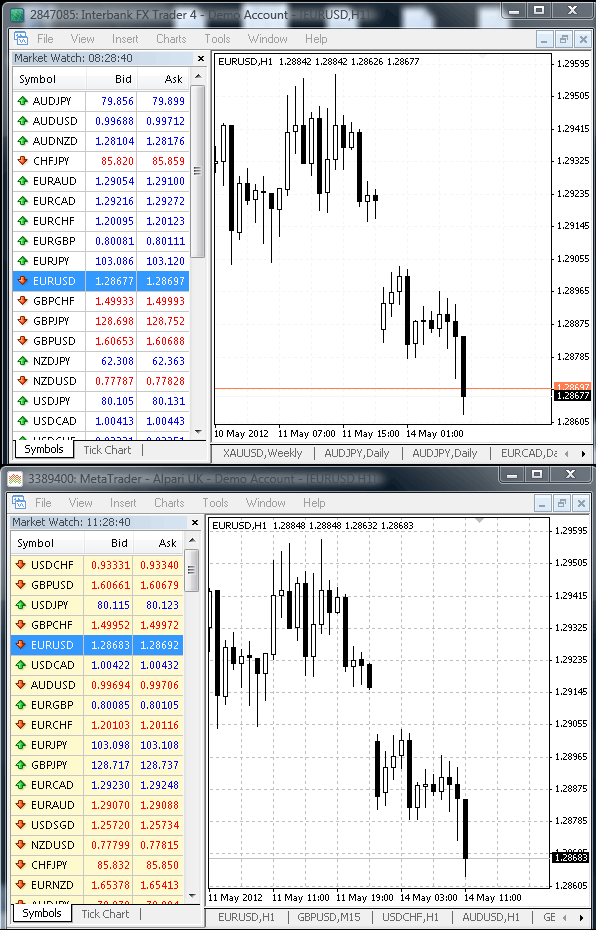
In the picture above, two demo brokers show prices about 0.5 pip apart at the same moment, with spreads of 2.0 and 0.9 pips. For a scalping EA with a 1-pip target, that matters a lot.
By default, LTC Client copies at any price: the “Deviation Type” setting is “Copy at any price”. If you trade short targets, you can set a price limit instead. A copy outside your limit then waits until the price comes back into range, or is skipped if you turn on IgnoreTradesWhenTooFar. Older versions had a single setting for this, Max Price Deviation Pips.
What changed since my first speed test
The video below is my original test. I recorded it with an older version of Local Trade Copier and published it on YouTube in August 2013. In it, I copy trades between six MT4 demo accounts at SGT Markets, Pepperstone, Alpari UK, Forex.com, FXCM and FXDD.
- Method: back then I quoted a single copy time from the video. In 2026 I time every copy from the master’s fill to the finished copy, and I report the median and how long 9 of 10 copies take.
- Platforms: the first test was MT4 only. LTC now copies MT4 to MT4, MT5 to MT5, MT4 to MT5 and MT5 to MT4. The current version is LTC 3.1.10, released on 6 November 2026.
- Where the delay comes from: I used to blame the broker for almost every delay. My 2026 timings show that LTC Server’s detection is the larger part, and the client broker adds about 0.15 to 0.2 seconds.
- Delay reporting: older versions (LTC 1.5) had a dashboard icon for broker delays. Today LTC Client logs the broker’s execution time for every copy.
FAQ
How fast does Local Trade Copier copy trades?
In my test, about 1 second for a single new trade: a median of about 0.8 seconds with an MT5 master and about 1 to 1.2 seconds with an MT4 master. That was on demo accounts on a Windows VPS in the Netherlands, with LTC 3.1.8 at default settings. Closes took a median of about half a second.
Does my broker affect copy speed?
Yes, but it isn’t the largest part. In my test, the client broker needed a median of about 0.15 to 0.2 seconds to execute a new copy. Detection by LTC Server took longer.
Was LTC 3.1.10 faster than 3.1.8?
Not from an MT5 master: I saw no consistent speed difference between the two versions. For an MT4 master, my comparison isn’t settled yet, so I make no claim either way.
Does a copied trade pass through an outside server?
No. LTC Server and LTC Client run on the same Windows PC or VPS and pass each trade through a small text file on that computer. Each copy then goes from the client terminal to its own broker over that terminal’s normal connection. The only connection LTC Server makes itself is its licence check, which sends no trades and no passwords.
Are these results from live accounts?
No. All my tests used demo accounts. I haven’t measured live accounts, so I don’t publish a live-account speed.
The best speed test is your own setup. Local Trade Copier runs on a Windows PC or VPS, and on a Mac through Wine. Every plan copies to unlimited MT4 and MT5 accounts. You can try it with the 7-day free trial and time your own copies with the log lines above.