
After more than 15,000 Local Trade Copier licences sold to traders in 140+ countries, my biggest lesson is simple: copying trades is rarely the hard part. The hard part is the setup around it, like symbol names, lot sizes, terminals and logs. Here’s what 16 years of support e-mails taught me, and the features those e-mails turned into.
I’m Rimantas Petrauskas. I’ve built apps for MetaTrader traders since 2009, and I created Local Trade Copier in 2010. I still develop it today, and I still read the support tickets.
1. What traders copy has changed
The job hasn’t changed: one trade, copied to more accounts. Whose accounts those are has changed a lot.
- Years ago, “share your trades with family and friends” brought in many buyers. One person trades, and a few people close to them follow.
- A few years later, it was account managers. Traders ran accounts for clients and used Local Trade Copier to keep them in sync. That’s much less common today.
- Today, it’s three groups:
- prop firm traders running several challenge and funded accounts;
- traders with several personal accounts;
- traders who copy one bot (an EA) to their other accounts.
The reviews say the same thing. This month we read the newest 82 Trustpilot reviews of Local Trade Copier. About 21 of them describe one job: a master account copied to many of the trader’s own accounts.
2. The five setup mistakes I see most
Symbol names that don’t match
For years, this was number one. Your master broker calls it EURUSD, your client broker calls it EURUSD.m, and gold is GOLD at one broker and XAUUSD at another. Copies failed until people mapped the names by hand.
Today, LTC Client works it out:
- It reads the suffix from the chart it runs on.
- It knows common aliases such as XAUUSD and GOLD.
- Since version 3.1.10, as a last resort, it also matches a symbol by its description, such as “Euro vs US Dollar”. This needs LTC Server 3.1.10 too.
“Will the lot size adjust?”
Many people ask this before they even try. Yes. By default, LTC Client sizes every copy to the client account’s own balance compared with the master’s. A $10,000 client copying a $100,000 master gets a tenth of the lot. The mode is called AA (Auto-Adjust to account size), and it converts between account currencies automatically.
“Why isn’t the lot the same?”
This is the other half of the same question. A trader copies a trade to a smaller account, the lot is smaller, and they write to me that something is wrong. Nothing is wrong. That’s AA doing its job.
If you want the same lot everywhere, set Money Management Mode to “Same lot size as on the master account”. For a fixed lot, use “Fixed Lot Size”. LTC Client has 8 modes in total, set separately on each account.
No OK button in MetaTrader 5
On MT5, if DLL imports aren’t allowed, the EA window has no OK button, so people think the EA is broken. It isn’t. Open the EA’s Dependencies tab and tick “Allow DLL imports”. Better still, turn it on for good in Tools > Options > Experts.
LTC Server and LTC Client on the same terminal
Some people attach both EAs to the same terminal and expect trades to copy. One terminal is one account. LTC Server goes on the master account’s terminal, and LTC Client goes on every other account’s own terminal.
By default, LTC Client also ignores trades from its own account, so it can’t copy a trade back to where it came from. To run several terminals side by side, install each one in its own folder; this guide shows how.
3. The best features started as one support ticket
Local Trade Copier 3.1.10 came out on 6 November 2026. Several of its changes began as a single customer’s e-mail:
- Rejected trades that were silently lost.
- One customer’s MT5 copies sometimes didn’t open, and the log didn’t say why.
- The reason: MetaTrader 5 reports every rejected order with the same error code and hides the real reason in the broker’s reply.
- LTC Client now reads that reply. It retries a copy rejected for a temporary reason, such as no connection, a timeout or a requote, instead of losing the trade.
- Limit orders that missed the winners.
- The same customer noticed something worse. When the master’s limit order filled, the copy sometimes kept waiting, because the client broker’s price stopped a fraction short of the level. Those were often exactly the winning trades.
- The new setting MarketCopyIfMasterPendingFilled turns a waiting copy into a market order once the master’s order has filled.
- It can do that for all pending orders, or for limit orders only, so stop copies can keep resting.
- Ten trades on one pair, but only one wanted.
- A prop trader’s master opens up to 10 split trades on the same pair. On his prop account, he wanted just one.
- LimitTradeCountPerPair could only delay the extras, so they opened later, at whatever the price was by then.
- The new setting IfPairLimitReached can now ignore them instead.
- A tutorial question that exposed a bug.
- While I was answering a customer, we found that Shift Entry combined with IgnorePendingOrders copied nothing at all.
- Now the shifted entry waits on the client’s side and opens at market when the price reaches it.
So if you have a problem nobody else seems to have, tell me. That’s how Local Trade Copier gets better.
4. What I wish every new buyer did in week one
Two things, and I’ll say them with a smile.
First, read the basics. The quick start guide is short, and it answers most first-week questions.
Second, when something doesn’t copy, send the logs. Sometimes I get an e-mail that says “Copier does not work, what should I do?” and nothing else. I’d love to help, but I can’t see your computer. Here’s what lets me find the problem in minutes:
- a screenshot of the master chart and of one client chart, with the EAs attached;
- the Experts tab of both terminals, around the time of the trade;
- which account is the master, which is the client, and what you expected to happen.
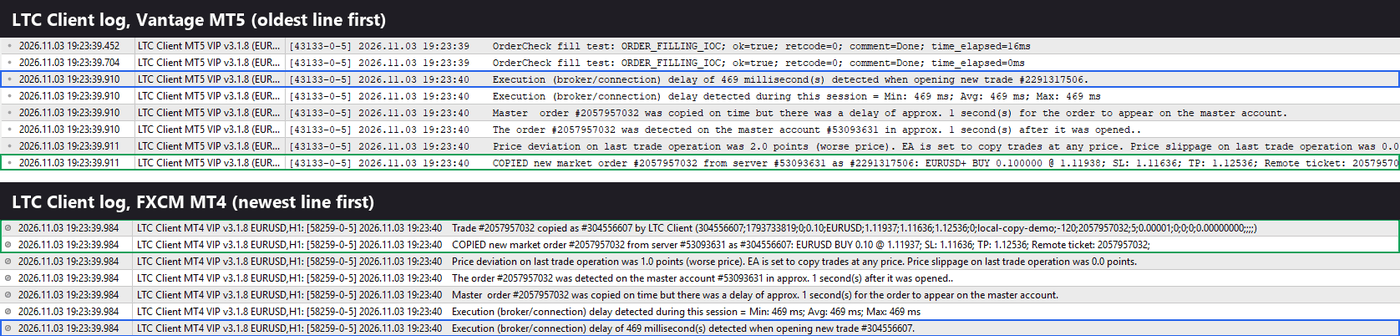
Often you won’t even need me. LTC Client writes one line for every trade it handles: “COPIED”, “DELAYED:”, “IGNORED:” or “ERROR!”, followed by the reason. Most answers are in that line.
5. Why I price per computer, not per account
In 2010, I locked every licence to the buyer’s account number by hand. Every new account meant more manual work, and it was tedious.
So I built my own licensing system, which is today’s Download Center, and made it count computers instead of accounts. That’s why every Local Trade Copier plan allows unlimited MT4 and MT5 accounts:
- PERSONAL covers 1 PC or VPS;
- MANAGER covers 5;
- VIP covers 15.
Add a new prop account, and nothing changes on your bill.
It started as a way to save my own time. It turned out to be what traders running many accounts needed most.
The short version
- Most people copy one master to many of their own accounts, and today those are often prop firm accounts.
- Different lots on different account sizes are a feature, not a bug.
- Most problems are in the setup, and the Experts tab usually names them.
- Your support ticket may become the next version’s feature.
If you trade more than one account and want to see this for yourself, try Local Trade Copier free for 7 days.