
MT4 and MT5 software · tutorial
Equity Sentry EA: protect your MT4 and MT5 account from drawdowns
Equity Sentry EA by Algonexis Technologies is an Expert Advisor that watches your MetaTrader account and acts when a limit you set is reached. It closes your trades, deletes pending orders and switches off AutoTrading, so no Expert Advisor can open new trades. We call this “Close & Stop”.
This guide covers version 1.9.7: how the EA works, how to install it, real use cases and every input.
What it does
What Equity Sentry EA does
Equity Sentry EA is a risk-control add-on for MetaTrader 4 and MetaTrader 5. It doesn’t open trades. It monitors the account 24/7 and runs the safety actions you choose when a trigger fires.
- Sets a hard stop for the whole account: an equity or balance level, or a % drop from the highest level.
- Watches floating loss and profit in %, in deposit currency or in pips.
- Stops after a set number of losing trades in a row.
- Closes trades, deletes pending orders, disables AutoTrading, closes other charts or closes the terminal.
- Sends a pop-up alert, an email and a push notification to the MetaTrader mobile app.
- Runs “On Timer” actions once at a date and time you choose.
It works with manual trading, with other Expert Advisors and with copied trades. One copy of the EA on one chart protects the whole account.
How it works
How Equity Sentry EA works
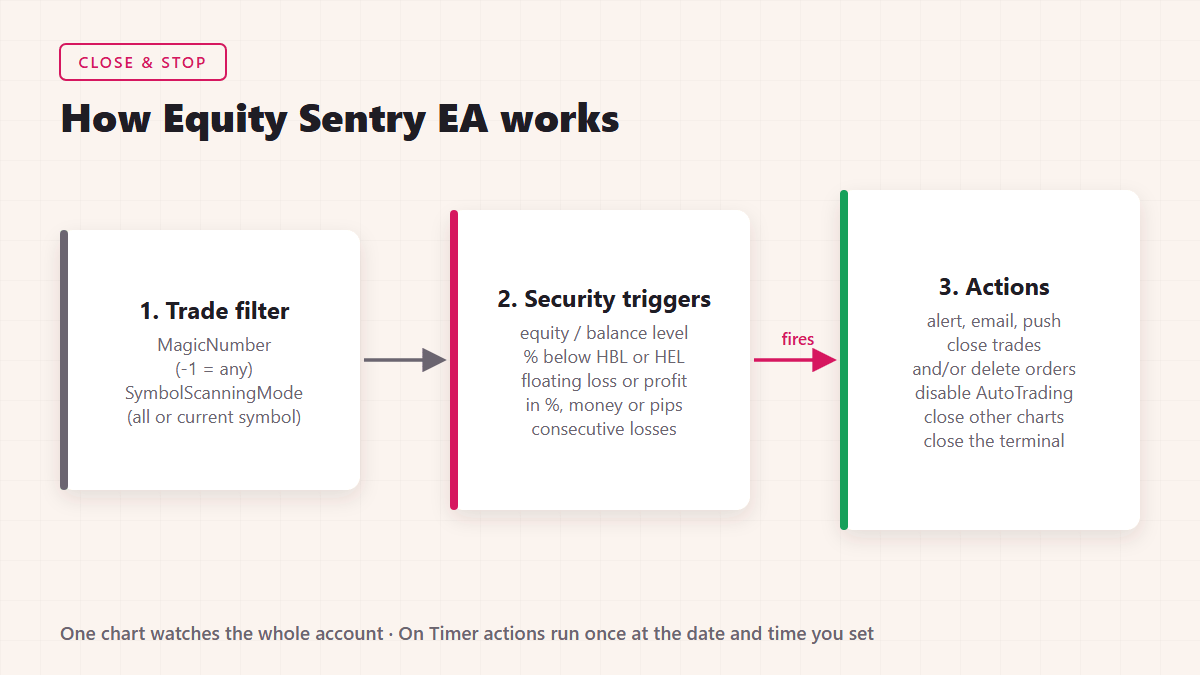
1. Trade filter
MagicNumber picks the trades the EA counts. The default, -1, means any magic number, including manual trades (magic number 0). SymbolScanningMode counts all symbols or only the symbol of the chart the EA runs on.
2. Security triggers
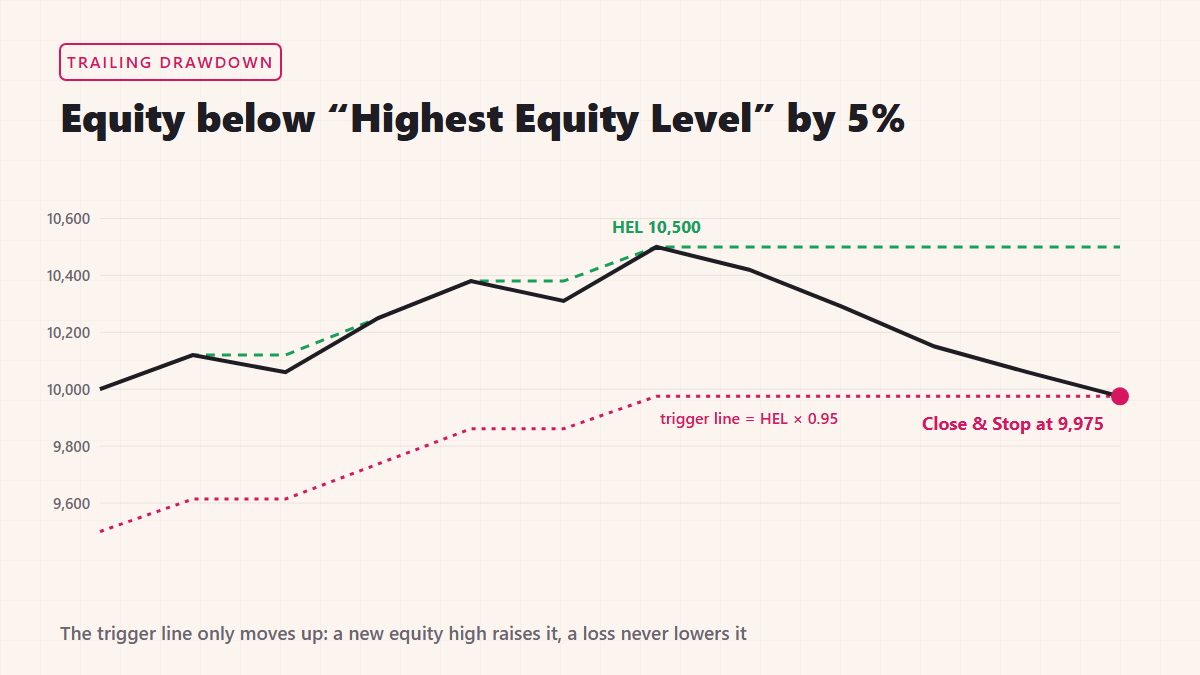
Triggers in group #1 look at the whole account: equity or balance below or above a level, or equity below the “Highest Balance Level” (HBL) or “Highest Equity Level” (HEL) by X%. The EA records the highest balance and equity for each account number and keeps them after a restart.
Triggers in group #2 look only at the trades that pass the trade filter: floating loss or profit in % of the balance, in money or in pips, and the number of consecutive losing trades. Each trigger is off when its value is 0.
3. Actions
When a trigger fires, the EA sends the alert, closes trades and/or deletes pending orders, and disables AutoTrading for all EAs. If you enable it, the EA first closes every other chart window, so the Expert Advisors on those charts are removed before any trade is closed. It can also close the terminal completely.
Each trigger fires once per start of the EA. If you set Disable Autotrading for All EAs to No, other EAs keep trading after the trades are closed. MetaTrader closes trades one at a time, so the final loss can be a little bigger or smaller than the level you set. Leave a safety margin.
Installation
Install and set up Equity Sentry EA on MT4 and MT5
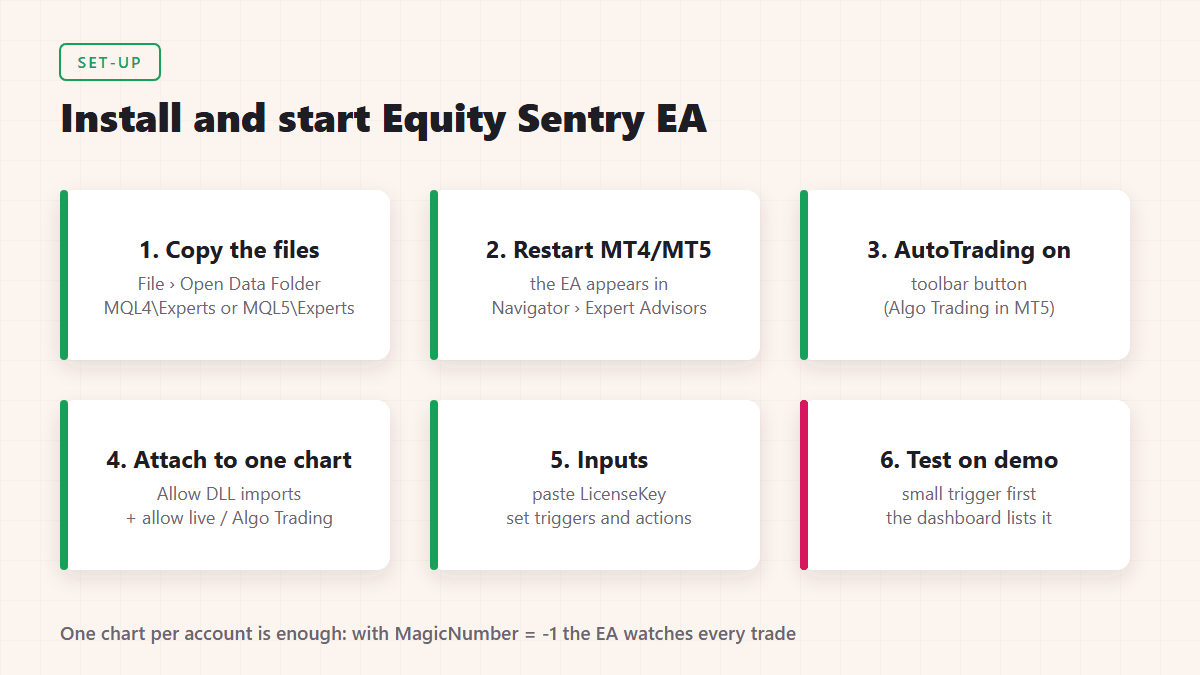
- Buy a plan on the Equity Sentry EA pricing page. You’ll get an email with access to your member’s area, where you download the software and find your license key.
- In MetaTrader, open File → Open Data Folder. Put the EA into MQL4\Experts (MT4) or MQL5\Experts (MT5), and its DLL library into the Libraries folder next to it.
- Restart the terminal. Equity Sentry appears under Navigator → Expert Advisors.
- Turn on AutoTrading in the toolbar (Algo Trading in MT5). The EA won’t start while it’s off.
- Drag the EA onto one chart. On the Common tab (MT4) tick Allow live trading and Allow DLL imports. In MT5, allow Algo Trading and allow DLL imports in the EA’s settings.
- On the Inputs tab, paste your key into LicenseKey, then set your triggers and actions. Click OK. The EA checks the license and shows a dashboard on the chart that lists your active triggers.
For email alerts, set up your mail server in Tools → Options → Email. For push alerts, enter your MetaQuotes ID in Tools → Options → Notifications; the EA won’t start with SendMobileNotifications on until notifications are enabled.
If a trigger is already met when you attach the EA and trades are open, it asks first. Click Yes to close the trades, or No to remove the EA and fix your settings.
Use cases
How traders use Equity Sentry EA
Prop firm maximum and daily drawdown
For a static maximum loss, set Equity drops below to your account’s floor, for example 90,000 on a 100,000 account with a 10% limit. For a trailing limit, use Equity drops below “Highest Equity Level” by X% or the HBL version, whichever matches your firm’s rule. Version 1.9.7 has no automatic daily reset, so for a daily loss limit set Equity drops below to today’s starting balance minus the daily limit, and update it before each session. Set every level slightly inside the firm’s limit.
Retail account protection
Pick the most you’re willing to lose, set it as an equity level or a % below HBL, and keep Disable Autotrading for All EAs on Yes. Add email or mobile alerts so you know what happened while you were away.
Stopping a misbehaving EA
Set MagicNumber to the EA’s magic number and use a group #2 trigger, such as a floating loss in money or Consecutive LOSS trade count reaches 5. Set CustomAccountHistoryStart to the day you started the EA, so older losses don’t count. Turn on Close other chart windows to remove the robot before its trades are closed.
Locking in a profit target
Use Equity reaches above, Balance reaches above or a floating profit trigger. When your target is reached, Equity Sentry closes everything and stops trading, so the profit isn’t given back.
News releases and weekends
Turn on the On Timer function and set a date and time, for example Friday 21:00 broker time or a few minutes before a major release. At that moment the EA closes trades and/or deletes orders, disables AutoTrading or closes the terminal, once.
Parameters
Equity Sentry EA parameter walkthrough
Inputs in the order they appear in version 1.9.7, with labels slightly shortened. A value of 0 switches a trigger off.
Trade filter
| Input | Default | What it does |
|---|---|---|
| Magic Number | -1 | Magic number of the trades to count. -1 means any. |
| Symbol scanning mode | All symbols | Count all symbols, or the current chart symbol only. |
Security triggers #1 (whole account)
| Input | Default | What it does |
|---|---|---|
| Use Trade Filter when closing trades | No | No closes every trade on the account. Yes closes only filtered trades. |
| Equity drops below | 0 | Fires when equity falls below this amount. |
| Equity reaches above | 0 | Fires when equity rises above this amount. |
| Balance drops below | 0 | Fires when balance falls below this amount. |
| Balance reaches above | 0 | Fires when balance rises above this amount. |
| Equity below “Highest Balance Level” by X% | 0 | Trailing stop on the highest balance reached (max 99). |
| Equity below “Highest Equity Level” by X% | 0 | Trailing stop on the highest equity reached (max 99). |
Security triggers #2 (filtered trades)
| Input | Default | What it does |
|---|---|---|
| Use Trade Filter when closing trades | Yes | Close only the trades that pass the filter. |
| Floating LOSS reaches X% | 0 | Floating loss as % of the balance. |
| Floating LOSS reaches X money | 0 | Floating loss in deposit currency. |
| Floating LOSS reaches X pips | 0 | Sum of the floating pips of all filtered trades. |
| Floating PROFIT reaches X% / money / pips | 0 | The same three triggers for profit. |
| Consecutive LOSS trade count reaches | 0 | Losing trades in a row in the closed history. |
Trigger actions
| Input | Default | What it does |
|---|---|---|
| Send Alert | Yes | Use the channels in the alert settings. |
| Close and Delete orders? | Close Open Trades & Delete Pending Orders | Or close trades only, delete pending orders only, or leave everything open. |
| Disable Autotrading for All EAs | Yes | Clicks the AutoTrading button for you, which stops every EA, Equity Sentry included. |
| Close other chart windows | No | Closes every chart except Equity Sentry’s. |
| Close MT4 platform completely | No | Shuts down the terminal. |
On Timer, alerts and other settings
| Input | Default | What it does |
|---|---|---|
| Enable “On Timer” function? | No | Runs the timer actions once at the date and time below. |
| At date & time of | 2024.01.01 17:00 | Broker server time. Set a future time. |
| Close and Delete orders? / Disable Autotrading / Close other chart windows / Close MT4 platform | Don’t close / No | Timer actions, same as above. |
| Play sound alert + popup | Yes | Pop-up alert in MetaTrader. |
| Send alerts by email | No | Uses the terminal’s email settings. |
| Send alerts to MT4 Mobile app | No | Push notifications via MetaQuotes ID. |
| Trailing Stop activates at X Pips | 0 | When a trade is X pips in profit, its stop loss follows the price X pips behind. |
| BreakEven activates at X Pips / BreakEven move X Pips in profit | 0 / 0 | At X pips of profit, move the stop loss to entry plus Y pips. |
| CustomPipSizes | empty | Your own pip sizes, e.g. XAUUSD=0.1,US30=1. |
| IncludeCommissionsAndSwap | true | Count commission and swap in floating P/L. |
| DashboardDisplay / DashboardColor | 2 / blue | 0 shows only a “running” line; higher values show the full dashboard. |
| CustomAccountHistoryStart | 2010.01.01 | Closed trades before this date are ignored. |
| HideInputBoxes | No | Hides the profit-target boxes on the chart dashboard. |
FAQ
Equity Sentry EA FAQ
Does Equity Sentry EA work on MT4 and MT5?
Yes. Equity Sentry EA by Algonexis Technologies runs on MetaTrader 4 and MetaTrader 5 on Windows, on your own PC or VPS.
Does Equity Sentry EA open trades?
No. It never opens trades. It only monitors the account, closes trades, deletes orders, disables AutoTrading and sends alerts.
Can it stop other Expert Advisors from opening new trades?
Yes. When a trigger fires, it can disable AutoTrading for all EAs and close every other chart, so no EA on the terminal can open new trades.
Can I use Equity Sentry EA on a prop firm account?
Yes. Use an equity level for a static maximum loss, the Highest Equity or Highest Balance Level % trigger for a trailing limit, and set levels slightly inside your firm’s limits.
Can it protect only one EA or one symbol?
Yes. Set MagicNumber to that EA’s magic number and/or set Symbol scanning mode to the current symbol, then use the group #2 triggers.
Does it need the computer to stay on?
Yes. It runs inside MetaTrader, so the terminal must be running and connected. A VPS keeps it running 24/7.
How many accounts can I protect?
The Personal plans cover unlimited real and demo accounts on 1 PC or VPS at a time. Run one copy of the EA in each terminal.
Where can I buy Equity Sentry EA?
At equitysentryea.com. Monthly and annual Personal plans are on the pricing page, with a 30-day money-back guarantee.
Get Equity Sentry EA
Download Equity Sentry EA, see the plans and read the full feature list at equitysentryea.com.