

I have updated my popular account equity protection app for MT4 terminal – Equity Sentry EA. Its latest 1.8 version has more features and does its job much better now. Furthermore, the new Equity Sentry EA (or ESEA) also works faster now and scans for trade changes not just on every price move, but also every 100ms.
If you are owner of ESEA license you can download its latest version from the Download Center. In case you forgot your password, please use your email to reset it.
Equity Sentry EA is the #1 MT4 Equity Protection EA which will guard your trading account by monitoring its equity and balance. When account’s floating loss drops to your preset level the ESEA will close all open positions and disable all running Expert Advisors. It can even close MT4 trading terminal to make sure that no other EA on your account performs any actions.
It’s like having a hard stop level set on your account to make sure you do not lose all your money and stop just at the right time in case your trading strategy goes into a loss.
Basically, if you are looking how to avoid Forex losses then Equity Sentry EA is exactly what you need.
What’s new in Equity Sentry EA v1.8
I have added quite a few new features and fixes few bugs. Let me give you more details on each improvement.
1. NEW: Easy-to-understand new parameter names
I believe by renaming some of the EA parameters (Inputs) ESEA became easier to use.
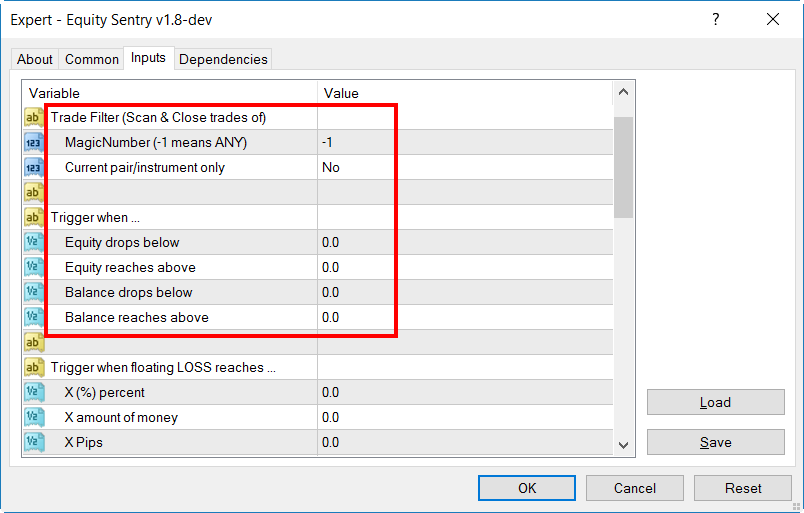
The new EA Inputs clearly tell you to set:
- Trade Filter (which trades you want ESEA to scan/monitor exactly)
- Trigger (when to you want ESEA to trigger one or more of its security features)
- Action on trigger (what do you want ESEA to do exactly on trigger)
- Timer (when and what do you want ESEA to do exactly)
2. NEW: Allows to set hard stop on account balance
Previously ESEA was able to monitor only equity level, but now you can configure it to monitor account balance too.
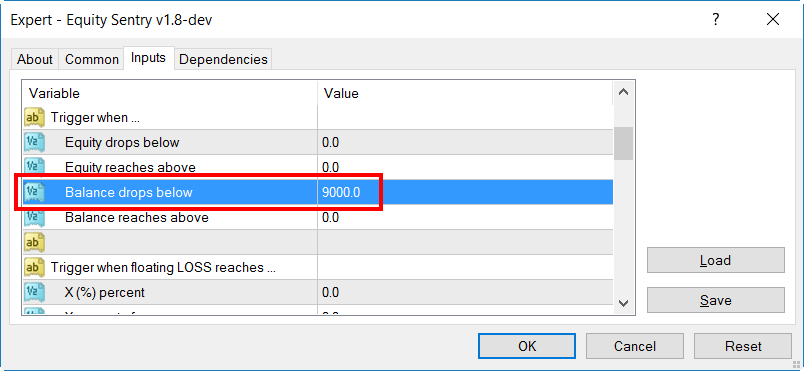
This is very useful in cases when you want ESEA to execute its protection commands not just on equity drop (which is floating loss of currently open trades), but also based on account balance drop (which changes only when trades are actually closed).
3. NEW: “On Timer” option to disable Autotrading or close MT4 terminal
Equity Sentry EA has a new “On Timer” feature which allows setting a specific date and time for certain commands. Basically, you can disable Autotrading (all Expert Advisors) or close MT4 trading terminal at your desired time.
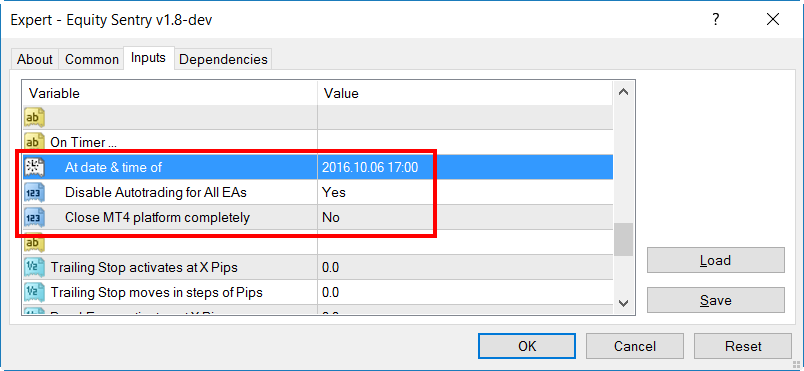
For example, you can set Equity Sentry EA to disable Autotrading and/or close MT4 terminal at the end of the trading session at 5 pm.
4. FIXED: Authorization engine
Equity Sentry EA used to stop working before after the weekend or when you wake up your computer from “sleep mode”. This was fixed now and EA will make several attempts to authorize the license.
5. FIXED: Improved “pair/instrument” trade filter
ESEA has an option to scan either current symbol trades (trades of an instrument it is running on, e.g. EURUSD) or trades of any symbol.
However, there was a bug which made ESEA to not work properly if set to scan only current symbol. Because of this, the old ESEA was still scanning trades on all symbols, but when the time came to close the trades it closed only the trades of the current symbol.
This has been fixed. Now, if you set the new ESEA to scan only current symbol (for example EURUSD), it will monitor only EURUSD trades and when the time comes to close the trades it will close only EURUSD trades.
You can also run multiple Expert Advisors on your MT4 in case you want ESEA to monitor trades on multiple symbols.
I hope you’ll find these improvements helpful and that Equity Sentry EA saved you from a lot of necessary drawdowns and disasters.
Please leave your comment below and let me know what you think is missing in Equity Sentry EA.